Cat Coaster Set SVG File: A Practical Guide for Laser Cutting Workflows
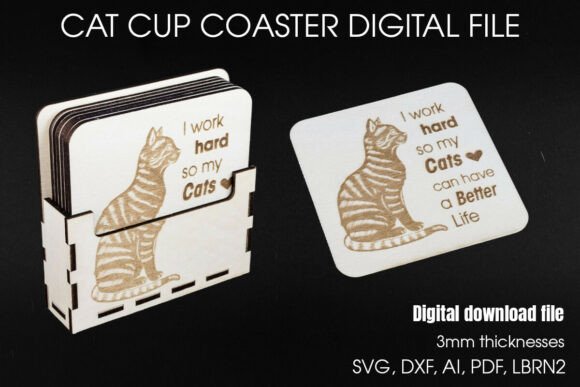
Integrating digital assets into physical product creation requires more than just a design file; it demands an understanding of material behavior, machine compatibility, and assembly logistics. The Cat Coaster Set SVG File serves as an excellent case study for creators looking to streamline their laser cutting or CNC routing processes. This specific digital download is not merely a graphic; it is a engineered template designed for 3mm materials, featuring precise cut lines, engrave paths, and structural components for a functional holder. For hobbyists, small business owners, and craft entrepreneurs, understanding how to implement this file effectively can significantly reduce trial-and-error time and improve the consistency of the final output.
Understanding the File Structure and Compatibility
Before sending any job to a laser cutter, such as a Glowforge, xTool, or Cricut Maker, it is essential to audit the provided vector files. This package includes SVG, DXF, AI, PDF, and LBRN2 formats. Each format serves a distinct purpose in different software ecosystems. SVG and DXF are universal standards compatible with most vector editing tools like Adobe Illustrator, Inkscape, and CorelDRAW. The AI format is optimized for Adobe users, while LBRN2 is specific to LightBurn, a popular laser control software. The inclusion of PDF allows for quick visual verification of dimensions without opening complex vector editors.
The design specifies a working area of 30.4 cm x 28.2 cm, which accommodates six 9 cm x 9 cm coasters and a matching holder. This layout is critical for material optimization. When preparing your workflow, ensure your material sheet is at least this size to avoid wasting stock. The file uses color-coded layers to distinguish operations: blue and black lines indicate cut paths, while red and navy blue lines designate fill engraving. Properly mapping these colors to your machine’s power and speed settings is the first step in a successful production run.
Material Selection and Preparation
The Cat Coaster Set SVG is engineered for 3mm thickness materials, including wood, MDF, and acrylic. Each material interacts differently with laser beams, affecting both cut quality and engraving contrast. For wood, birch plywood offers a clean edge and minimal charring, making it ideal for the intricate cat illustration and text engraving. MDF provides a uniform surface but may produce more smoke and residue, requiring thorough post-processing cleaning. Acrylic yields a polished, professional look but requires careful parameter tuning to prevent melting or flame-ups during the cutting phase.
Preparation extends beyond choosing the right sheet. Ensure the material is flat and free of warping, as uneven surfaces can cause focal length issues, leading to incomplete cuts or blurred engravings. Secure the material firmly to the honeycomb bed or using masking tape to prevent shifting during high-speed movements. For acrylic, leaving the protective film on during cutting helps prevent scratches, though it should be removed before engraving if the film interferes with laser absorption.
Workflow Integration: From Design to Production
Implementing this digital file into your workflow involves several key stages: import, adjustment, nesting, and execution. Start by importing the SVG or DXF file into your preferred design software. Verify that the dimensions match the specified 9 cm x 9 cm for each coaster. If you are using software that does not automatically recognize layer colors as operational commands, you will need to assign cut and engrave settings manually based on the color legend provided.
Nesting is crucial for efficiency. The file is pre-nested to fit six coasters and the holder within a compact footprint. However, if you are producing batches for craft fairs or online sales, consider duplicating the nest across larger sheets of material to maximize throughput. Always maintain adequate spacing between pieces to allow for heat dissipation and to prevent accidental fusion of adjacent cuts. For machines with camera positioning features, such as the Glowforge, use the registration marks or corners of the design to align the virtual workspace with the physical material accurately.
Engraving Quality and Text Clarity
The phrase “I work hard so my cats can have a better life” is a central feature of this design. Ensuring this text remains legible requires attention to engraving settings. Too much power can burn the wood excessively, causing the letters to blur together. Too little power may result in faint, unreadable text. Conduct test runs on scrap pieces of the same material to dial in the optimal speed and power combination. For darker woods, consider increasing the contrast by performing a double pass or adjusting the frequency (PPI) to create a denser dot pattern.
The cat illustration also benefits from fine-tuning. Intricate details like whiskers and ears require precise focus. If your laser lens is dirty or out of focus, these delicate lines may disappear or appear jagged. Regular maintenance of your equipment ensures that the engraved details remain sharp and consistent across all units in a batch.
Assembly and Finishing Techniques
Once the cutting and engraving processes are complete, the assembly phase begins. The holder component is designed to slot together, providing a stable base for the coasters. Dry-fit the pieces first to ensure all tabs and slots align correctly. If the fit is too tight, lightly sand the edges of the tabs. If too loose, consider applying a small amount of wood glue for a permanent bond. For acrylic sets, solvent welding can create seamless joints, but this requires ventilation and careful handling.
Finishing touches elevate the perceived value of the product. For wooden coasters, sanding the edges with fine-grit sandpaper removes char marks and splinters. Applying a food-safe sealant or beeswax protects the wood from moisture and enhances the natural grain. For acrylic, polishing the cut edges with a flame polisher or specialized compound restores clarity and removes frostiness. These steps transform a raw laser-cut piece into a polished, market-ready item.
Commercial Viability and Customization
For entrepreneurs selling at craft fairs or on platforms like Etsy, this Cat Coaster Set SVG File offers a scalable product line. The humorous text appeals to a broad demographic of cat owners, making it an impulse-buy friendly gift item. To differentiate your offerings, consider personalizing the design. While the base file is fixed, you can add custom elements in your vector software, such as buyer names or additional graphics, provided you respect the licensing terms of the original creator.
Packaging also plays a role in the customer experience. Since the set includes a holder, presenting the coasters neatly stacked within it creates an attractive display. Use eco-friendly packaging materials to align with the handmade, artisanal aesthetic. Including care instructions for the specific material used (wood vs. acrylic) demonstrates professionalism and reduces post-purchase support queries.
Troubleshooting Common Issues
Even with a well-designed file, issues can arise. If cuts are not going through completely, check your laser tube alignment, lens cleanliness, and material flatness. Increase power slightly or reduce speed, but do so incrementally to avoid excessive charring. If engraving appears uneven, ensure the material is level relative to the laser head. For acrylic, yellowing around cut edges indicates too much heat; increase air assist and speed to mitigate this.
Software glitches can also occur. If lines appear missing after import, check if the file was saved with compatible version settings. Converting strokes to outlines in Illustrator before saving as SVG can prevent path interpretation errors in other programs. Always keep a backup of the original files to revert changes if necessary.
Long-Term Utility and Skill Development
Using structured files like this one helps build foundational skills in digital fabrication. By analyzing how the cut lines and engrave paths are organized, creators learn best practices for file preparation. These skills transfer to other projects, enabling more complex designs and efficient production workflows. Over time, maintaining a library of tested settings for different materials and machines reduces setup time and increases overall productivity.
In conclusion, the Cat Cup Coaster SVG is more than a novelty item; it is a practical tool for developing and refining laser cutting techniques. By focusing on material preparation, precise machine calibration, and thoughtful finishing, creators can produce high-quality, durable products that resonate with customers. Whether for personal enjoyment or commercial venture, mastering the integration of such digital assets into physical workflows is a valuable competency in the modern maker economy.