Transforming Digital Literacy with the Keyboard Buttons Font
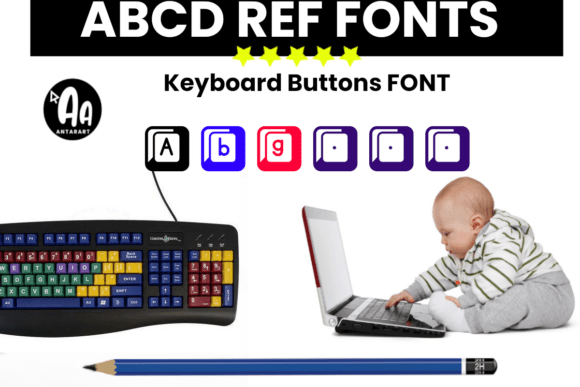
In the modern educational landscape, visual engagement is not merely a luxury; it is a necessity. As educators strive to make abstract concepts tangible, the tools we use to present information play a pivotal role in student comprehension and retention. One such tool that has gained significant traction in recent years is the Keyboard Buttons font. Designed to meticulously resemble real physical keyboard keys, this unique typeface bridges the gap between digital instruction and tactile recognition, adding an authentic digital vibe to worksheets, posters, and classroom displays.
The appeal of this typographic style goes beyond mere aesthetics. It serves a functional purpose in computer literacy lessons, typing practice activities, and tech-themed bulletin boards. By integrating elements that students recognize from their daily interaction with technology, teachers can create a more immersive and intuitive learning environment. This article explores how leveraging the Keyboard Buttons aesthetic can enhance educational materials, improve user experience in digital tutorials, and add a professional yet playful touch to various creative projects.
The Psychology of Familiarity in Learning Materials
When students encounter instructional material that mirrors the interface they use every day, cognitive load is reduced. The brain does not have to translate abstract symbols into actionable commands because the visual representation is already familiar. This is where the Keyboard Buttons font shines. Unlike standard sans-serif or serif fonts that require the reader to interpret text as generic instructions, this font visually simulates the actual hardware.
Consider a typing lesson for elementary students. A worksheet that simply lists "Press Shift and A" is functional, but it lacks immediate visual reinforcement. However, when those same instructions are presented using a font that looks like raised plastic keys with distinct borders and shadows, the connection becomes instantaneous. The student sees the visual cue, associates it with the physical key under their fingers, and executes the action with greater confidence. This mimicry of reality helps bridge the gap between theoretical knowledge and practical application.
Enhancing Computer Literacy Lessons
Computer literacy is no longer an optional skill; it is a fundamental requirement for academic and professional success. Teaching shortcuts, command lines, and software navigation can be daunting for beginners. Using a font that resembles keyboard keys transforms dry textual instructions into engaging visual guides.
- Shortcut Visualization: Instead of writing out "Control plus C," you can display Ctrl + C in a way that highlights the specific keys involved. This reduces ambiguity and helps students memorize combinations faster.
- Interface Mapping: When creating guides for new software, using key-like graphics helps users map on-screen prompts to their physical devices, reducing frustration during the initial learning curve.
- Error Reduction: Clear visual distinction between similar keys, such as the number '1' and the letter 'l', or the zero and the letter 'O', is easier to achieve with stylized key graphics than with standard typography.
By incorporating these elements into your lesson plans, you are not just decorating pages; you are providing scaffolding that supports independent learning. Students can refer to these visual aids without constant teacher intervention, fostering autonomy in the computer lab.
Practical Applications Beyond the Classroom
While the primary audience for this style of typography is often education, its utility extends far beyond school walls. The clean, structured look of Keyboard Buttons lends itself well to any context where clarity and technical precision are valued. From corporate training manuals to DIY tech blogs, the ability to highlight specific inputs is invaluable.
Tech-Themed Bulletin Boards and Displays
Classroom decor sets the tone for learning. A tech-themed bulletin board featuring coding quotes, internet safety tips, or digital citizenship rules becomes instantly more relevant when the text mimics the medium it discusses. Using this font for headers or accent words creates a cohesive theme that resonates with digital natives.
For example, a display on "Cybersecurity Basics" could feature large, eye-catching headers made with the font, while the body text remains in a readable standard typeface. This contrast draws attention to key concepts like Password, Login, and Encrypt, making them stand out as interactive elements rather than passive text. It invites students to look closer and engage with the content, turning a static wall into an interactive learning zone.
Creating Professional-Looking Worksheets
Teachers often spend hours formatting documents to ensure they are clear and accessible. The Keyboard Buttons font simplifies this process by eliminating the need to insert individual images for each key. Instead, you can type directly, knowing that the output will automatically resemble a keyboard layout. This efficiency allows educators to focus on pedagogy rather than graphic design.
Moreover, these worksheets have a polished, professional appearance that signals to students that the content is serious and well-prepared. Whether you are creating a maze activity where directions are given via arrow keys or a coding logic puzzle, the consistent visual language enhances the overall quality of the material.
Design Considerations and Best Practices
While the aesthetic benefits are clear, effective use of any specialized font requires balance. Overusing a decorative typeface can lead to visual clutter and reduced readability. Here are some guidelines to ensure your materials remain effective and accessible.
- Maintain Readability: Use the Keyboard Buttons font primarily for short phrases, single keys, or hotkeys. Avoid using it for long paragraphs of text, as the intricate details of the key designs can strain the eyes over extended reading periods.
- Contrast is Key: Ensure there is sufficient contrast between the text and the background. Since many key-style fonts have internal shading or borders, placing them on busy backgrounds can make them difficult to decipher. Stick to clean, solid colors for best results.
- Consistency: If you choose to represent the "Enter" key with a specific shape or label, maintain that consistency throughout all your materials. Inconsistent visual language can confuse learners who are trying to build mental models of the keyboard layout.
- Accessibility: Always consider students with visual impairments. While the font is visually appealing, ensure that critical instructions are also provided in plain text or through alternative means if the stylized font proves difficult for certain users to interpret.
Integrating into Modern Workflows
In an era where digital content creation is streamlined through various software platforms, compatibility is crucial. Most modern word processors, graphic design tools, and presentation software support custom font installation. Once installed, the Keyboard Buttons font behaves like any other typeface, allowing for easy resizing, coloring, and styling.
This flexibility means you can adapt the font to fit your brand colors or school theme. You might choose to color-code keys based on function—blue for navigation, green for confirmation, red for deletion—adding another layer of semantic meaning to your documents. This level of customization empowers creators to tailor their materials precisely to their audience's needs.
Making Your Classroom Materials Pop
Ultimately, the goal of using specialized fonts like Keyboard Buttons is to capture attention and facilitate understanding. In a world saturated with information, standing out is essential. By adding a digital vibe to your worksheets and posters, you signal to students that the content is modern, relevant, and engaging.
Get creative with how you apply this resource. Use it for gamified learning experiences where students "unlock" levels by completing tasks associated with specific keys. Use it to create realistic simulations of command-line interfaces for advanced coding classes. The possibilities are limited only by your imagination.
As technology continues to evolve, so too must our methods of teaching it. Embracing tools that reflect the digital nature of the subject matter is a step toward more effective, engaging, and meaningful education. Whether you are a seasoned IT instructor or a generalist teacher looking to integrate more tech into your curriculum, the Keyboard Buttons font offers a simple yet powerful way to enhance your instructional materials. It is more than just a font; it is a bridge between the learner and the machine, designed to make the journey smoother, clearer, and more enjoyable.