Christmas Gnome and Candy Cane: Elevating Your Holiday Embroidery Projects
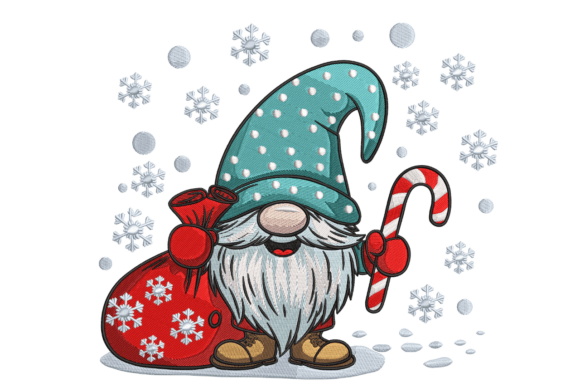
The holiday season brings a unique pressure for creators. Whether you are stitching gifts for family or preparing inventory for a winter market, the demand for high-quality, festive designs is immense. Among the most popular motifs this year is the whimsical combination of a Christmas Gnome and Candy Cane. This design captures the playful spirit of the season while offering a classic color palette that appeals to a broad audience. However, simply downloading a file and hitting "start" on your machine is rarely enough to guarantee professional results. Many crafters overlook critical details in file selection, stabilization, and thread management, leading to frustration and wasted materials.
Understanding how to properly integrate this specific motif into your workflow can transform a good project into a standout piece. The charm of the gnome paired with the bold stripes of the candy cane offers excellent opportunities for texture and color play, but only if executed with precision. This guide explores common pitfalls and provides practical advice to ensure your embroidery projects are efficient, durable, and visually appealing.
Avoiding File Format Misunderstandings
One of the most frequent mistakes beginners make is assuming all digital embroidery files are universal. A Christmas Gnome and Candy Cane design might be advertised as compatible with "most machines," but this requires careful verification. Embroidery machines read specific proprietary formats such as PES, DST, JEF, or VIP. Using a converter tool can sometimes alter stitch density or pull compensation, resulting in a distorted image.
What goes wrong: When you force a file format conversion without checking the preview, you may encounter thread breaks, bird nests, or misaligned colors. The intricate details of the gnome’s beard or the sharp edges of the candy cane can become blurred or jagged.
The better approach: Always download the native format for your specific machine model whenever possible. If you must convert a file, use reputable software that allows you to preview the stitch path before loading it onto your USB drive. Check that the design includes multiple sizes. A design that looks perfect at four inches may lose definition when scaled down to two inches for a pocket logo. Verify that the vendor provides a range of sizes to suit different applications, from large tote bags to small ornament covers.
Stabilization Errors That Ruin Fabric
Even the best digitized design will fail if the fabric is not properly supported. The Christmas Gnome and Candy Cane motif often involves dense satin stitches for the candy cane stripes and complex fill stitches for the gnome’s hat and body. These elements create significant pull on the fabric.
Common oversight: Many hobbyists use a single layer of cut-away stabilizer for all projects. While cut-away is durable, it can be too stiff for lightweight cotton t-shirts or delicate decorative fabrics, causing the garment to pucker around the design. Conversely, using tear-away stabilizer on stretchy knit fabrics leads to distortion during washing.
Practical advice: Match your stabilizer to both the fabric and the design density. For knit fabrics like t-shirts, use a soft cut-away stabilizer to provide ongoing support without stiffness. For woven tote bags, a medium-weight tear-away may suffice, but consider adding a topper if the fabric has a nap or loose weave. Always hoop your stabilizer with the fabric, ensuring it is drum-tight but not stretched out of shape. This tension balance is crucial for maintaining the geometric integrity of the candy cane stripes.
Thread Color and Contrast Mistakes
Color selection can make or break the visual impact of your embroidery. The traditional red and white of the candy cane are iconic, but pairing them with the gnome’s attire requires a keen eye for contrast.
The pitfall: Choosing threads that are too similar in value causes the design to look flat from a distance. For example, using a dark red for the candy cane against a navy blue gnome hat may blend together, losing the distinct separation between elements. Additionally, ignoring thread weight can affect the texture. Standard 40-weight rayon or polyester is typical, but using 30-weight thread for small details can cause bulkiness and needle deflection.
Solution: Lay your thread spools next to the fabric before stitching. Ensure there is sufficient contrast between the gnome’s features and the background fabric. If stitching on dark fabric, consider using a lighter underlay or adjusting the digitizing settings to increase stitch density slightly for better coverage. Test stitch the design on a scrap piece of the same fabric to evaluate color interaction and thread sheen. This small step saves hours of unpicking later.
Neglecting Machine Maintenance During High-Volume Stitching
Holiday crafting often involves producing multiple items in a short timeframe. Running your machine continuously for Christmas Gnome and Candy Cane designs without proper maintenance leads to inconsistent quality.
Impact on quality: Lint buildup in the bobbin case or a dull needle can cause skipped stitches or thread shredding. This is particularly problematic with metallic threads, which are sometimes used for accentuating the gnome’s buttons or the candy cane’s shine. Metallic threads are fragile and require slower speeds and specialized needles.
Best practice: Change your needle after every eight to ten hours of stitching or at the start of each new project batch. Clean the bobbin area regularly to remove lint accumulation. If you are using specialty threads, reduce your machine speed by twenty percent to prevent heat buildup and breakage. Keep a log of which threads and needles work best for specific fabric types to streamline future projects.
Choosing the Right Application for Your Design
Not every item is suitable for every embroidery design. The size and complexity of the Christmas Gnome and Candy Cane pattern should dictate where you place it.
- T-shirts: Ideal for left-chest placement or large back prints. Ensure the design size does not exceed the comfortable wear area.
- Tote bags: Perfect for centered, larger designs. The sturdy canvas supports dense stitching well.
- Decorative pillows: Consider placing the design off-center for a modern look. Use heavier stabilizers to prevent pillow stuffing from showing through stitches.
- Kitchen towels: Avoid placing dense designs near the hem where they may interfere with folding or ironing.
By understanding the limitations and strengths of your materials, you can avoid costly errors. Always check the hoop size requirements of the design before purchasing or downloading. A design that requires a 5x7 hoop cannot be stitched in a 4x4 hoop without splitting and realigning, which introduces alignment risks.
Ultimately, success with this festive motif comes from preparation and attention to detail. By selecting the correct file formats, using appropriate stabilization, choosing contrasting threads, and maintaining your equipment, you ensure that every Christmas Gnome and Candy Cane creation reflects your skill and creativity. These steps not only improve the final product but also enhance your efficiency, allowing you to enjoy the crafting process rather than fighting against technical issues. Take the time to test and refine your approach, and your holiday projects will stand out for their quality and charm.